Free & open source · for StartOS

Know the moment they're wheels up.

TailWatcher follows the planes and flights your household cares about on free, public ADS-B data, and pings everyone's phone through the ntfy app the moment one takes off. It also keeps an eye on the plane flying in for your next trip, so you hear it's running late before the gate agent tells you.

  • MIT licensed
  • No accounts
  • No subscription
  • Runs on your own server
12:00
Tuesday, October 20

Departures

LOCAL 12:00 · SAMPLE DATA
TimeFlightPlaneToRemarksWhat TailWatcher is doing
Board theme · split-flap tiles flip only when a status changes See the real dashboard →

Tail numbersFollow one specific aircraft, like a friend's Cessna or the club's Piper, by its registration.

Flight numbersFollow whichever plane the airline puts on UA1234 today. The alert names it: "UA1234 (N38473) departed".

Your tripsFollow the plane coming to pick you up, and hear early if it's going to make you late.

Features

Everything on board

TailWatcher started as "tell me when Dad's plane takes off". It now handles the whole trip, for everyone in the house, from one small app on your Start9.

Boarding pass · Watch
GNDon the ground
AIRalert sent

Takeoff and landing alerts

Send N12345 or UA1234 and TailWatcher checks it every minute. Each alert gives the nearest airport, altitude, speed and heading, and opens the plane on a live map when tapped.

Feedadsb.fi
Checks60 s
AlertWheels up
Boarding pass · Trips
ORDyour plane
IADyour gate

Where's my plane?

Your flight's plane is usually still finishing an earlier flight somewhere else. TailWatcher follows it in and warns you when it will land within 45, then 20, minutes of your departure.

FlightUA1234
PlaneN38473
StatusOn its way
Boarding pass · Share
YOUflying
FAMnotified

Family in the loop

Share a trip with share 1 Mom & Dad and they get one note, then your departure and landing on the day. No app to learn: they tap one invite link to subscribe.

Shared2 people
LegsOut + back
AlertLanded

Also on board

Round trips

Enter the flight out and the flight home in one go: inbound UA1234 11/14 return UA5678 11/21.

Connecting flights Soon

Add a connection with then and hear how many minutes you'll have to make it.

Import a trip Soon

Paste a booking confirmation, or drop in an .eml or .ics file, and the trip form fills itself in.

Text commands

Everyone manages their own list by typing in their ntfy topic: N12345, list, remove.

Look up any plane

info N12345 replies with the type, FAA owner city and state, engine, live position and a photo.

Dashboard, two looks

A web dashboard for the whole house, in a clean Modern theme or a split-flap departures Board.

Where is it now Soon

Each plane shows roughly where it is, like "40 nm NE of Denver, CO", or Parked once it goes quiet.

Invite links

Text someone a normal web link. It walks them through installing ntfy and subscribing in two taps.

Renumbered flights

When an airline renumbers or cancels your flight, TailWatcher notices and suggests the likely new number.

One app, whole household

Each person gets their own watcher, alert list, landing setting and priority. A plane two people follow is checked once.

Free, unfiltered ADS-B

Community feeds adsb.fi and adsb.lol, polled in one batched request per cycle, with automatic fallback.

Your server, your alerts

Use public ntfy.sh with zero setup, or keep every alert on your own hardware with StartOS's NTFY.

How it works

Your flight plan

Four waypoints from install to the first alert. Most people are done in about five minutes.

  1. 1
    WPT INSTL

    Install on StartOS

    Add TailWatcher to your Start9 server. It needs nothing else: no NTFY package, account or token.

  2. 2
    WPT WATCH

    Add a watcher

    Open the dashboard and tap + Add watcher for each person who wants alerts. A name is all it needs.

  3. 3
    WPT PHONE

    Connect their phone

    Connect phone makes a one-tap subscribe link for the free ntfy app. Text it to them, wherever they are.

  4. 4
    WPT WHEELS

    Wheels up

    Add a tail or flight number, from the dashboard or by texting it. The next takeoff lands on their lock screen.

Signal path

Every minute, one batched request covers every plane anyone is watching.

Aircraft ADS-B transponder adsb.fi · adsb.lol Volunteer feeds free, unfiltered every 60 s TailWatcher ntfy.sh or yours ntfy push service Phones iOS · Android
Trips

Where's my plane?

Your airline app says "on time" right up until it doesn't. The plane you'll board is still in the air somewhere else, and that's the first place a delay shows. TailWatcher watches it for you.

  • No key needed. Text inbound UA1234 N38473 dep 4:30pm with the plane from your airline's "Where's my plane?" screen.
  • Or let it look things up. With a free AeroDataBox key, inbound UA1234 11/14 is enough. It finds your time and the assigned plane, and re-checks as the day gets closer.
  • Light on requests. A trip booked a month ahead uses about 20 of the free plan's 400 monthly requests.
  • Never changes things behind your back. If your flight is renumbered it suggests the new one; you confirm with change.
  1. 🧳 UA1234: your plane is on an earlier flightN38473 is flying UAL412 DEN→ORD first, then on to IAD for your flight.
  2. ✈️ UA1234: your plane is on its wayN38473 is in the air as UAL587. Due at IAD around 11:35 AM. Your UA1234 departs 12:30 PM, 55 min after it lands.
  3. ⏳ UA1234: tight turnaroundN38473 is now due around 11:50 AM. Your UA1234 departs 12:30 PM, 40 min after it lands.
  4. 🛬 UA1234: your plane landedN38473 is on the ground at IAD. Your UA1234 departs 12:30 PM, 38 min after it lands.

Round trips

Both flights in one message. They're listed together, shared together, and cancelled together unless you add only.

Time zones handled

dep 6pm from LAS means 6pm in Las Vegas. Every airport's zone ships with the app.

Sharing that stays quiet

Family get your departure and landing, not every inbound-plane update. It only follows your flight around its own departure.

Text commands

Just type it in

Each person's ntfy topic doubles as a chat with TailWatcher. They can add, rename and remove their own planes from the message bar, and nobody else's list.

Alexntfy.sh/tw-alex-q7f3m9…
add N731RG Club Cessna
✅ Added N731RG (Club Cessna). Watching 2 aircraft.
SendDoes
N12345 or UA1234Watch a tail number or a flight number
add N12345 Vegas tripWatch it with a nickname
UA1234 for 2 daysStop automatically. Also 12h, until fri
listYour list, what's airborne, time left
info N12345What it is, who owns it, where it is now
inbound UA1234 11/14Follow the plane flying in for your flight
share 1 Mom & DadSend them your takeoff and landing
remove N12345Stop watching

Send help for the full list, or read the text commands guide.

The dashboard

Pick your terminal

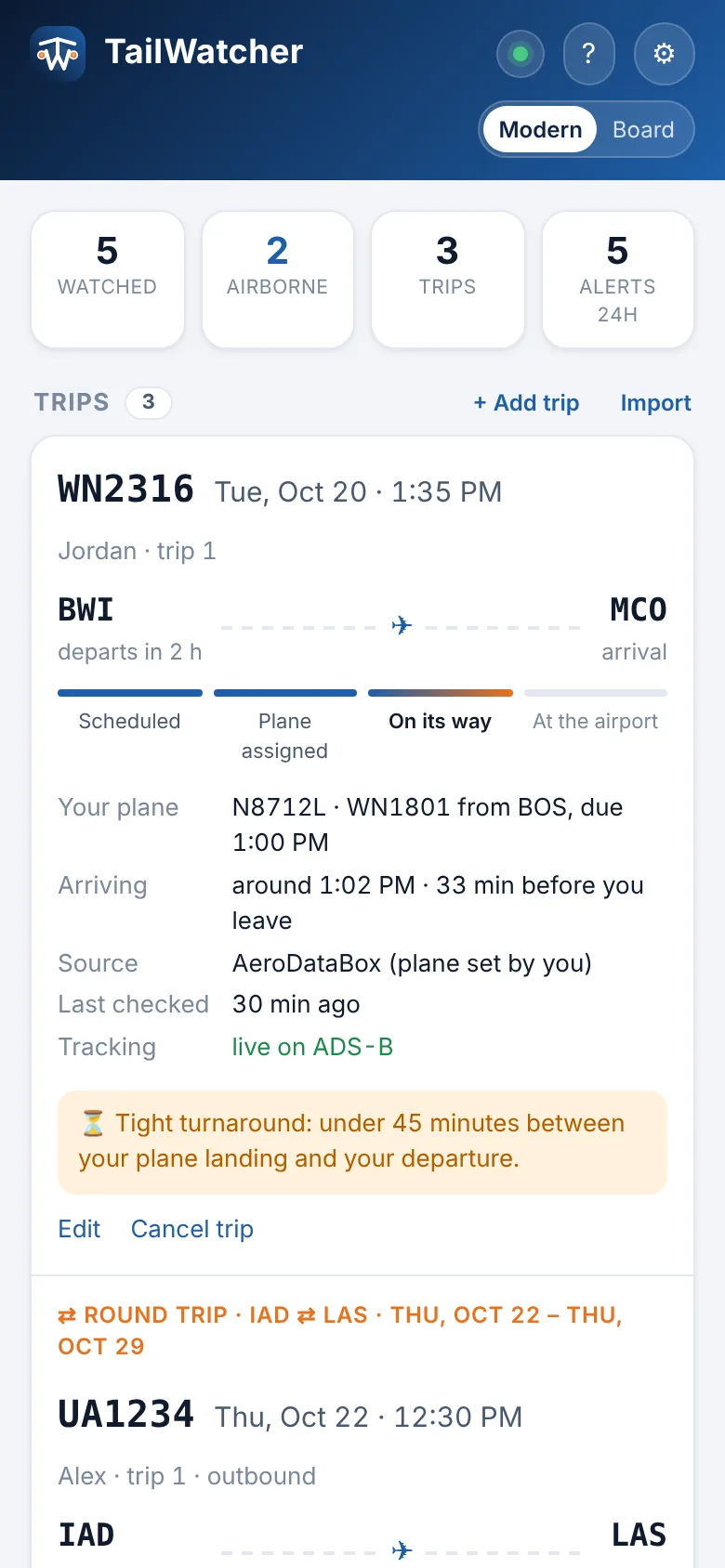
The Web UI shows every watcher, plane and trip in the house, recent alerts, and whether everything's healthy. Add and edit right on the page.

tailwatcher.local
TailWatcher dashboard in the Modern theme: trip cards with a progress bar from Scheduled to At the airport, and an activity feed of alerts
The Modern theme on a phone

Modern: trip cards with a progress bar from Scheduled to At the airport, each person's planes with live status, and a feed of everything sent. Screenshots use sample data.

Install

Pre-flight checklist

TailWatcher is a StartOS 0.4 service. It's on its way to the Start9 community registry; until then you can build and sideload it.

  1. 1

    Get the package

    Build the .s9pk from source on any Linux or macOS machine with Docker, Node.js and start-cli.

    # clone and build tailwatcher_x86_64.s9pk
    git clone https://github.com/RogerUp-Labs/tailwatcher
    cd tailwatcher
    make
  2. 2

    Sideload it

    Upload the .s9pk with StartOS's Sideload option, or run make install to send it to the server in ~/.startos/config.yaml.

  3. 3

    Open the Web UI

    Start TailWatcher, open its Web UI, add a watcher for each person and tap Connect phone.

  4. 4

    Optional extras

    Paste a free AeroDataBox key in ⚙ Settings for automatic trip lookups, or switch alerts to your own NTFY with Set up NTFY for me.

FAQ

Questions from the cabin

Is it really free?

Yes. TailWatcher is MIT-licensed, the ADS-B feeds are free community projects, ntfy.sh is free, and AeroDataBox's Basic plan is free. There's nothing to subscribe to.

Which planes can it follow?

Anything broadcasting ADS-B that a volunteer receiver can hear: airliners, business jets, most private planes and many helicopters, worldwide. Coverage on the ground at small airports is thinner, so a takeoff there may arrive as "is airborne" a few minutes later.

Do I need my own ntfy server?

No. By default alerts go through the public ntfy.sh service, and each person's topic is a long random name. If you'd rather keep alerts on your own hardware, install NTFY on StartOS and tap Set up NTFY for me in Settings.

Does it work on iPhone?

Yes, with the free ntfy app from the App Store. Use ntfy.sh for instant iPhone alerts: a self-hosted NTFY can't use Apple's push service, so alerts may wait until the app is opened.

What about planes hidden from FlightAware?

The feeds TailWatcher uses are unfiltered, so planes in the FAA's LADD program still show up. Aircraft in the FAA's PIA privacy program broadcast a temporary address and can't be followed by tail number anywhere.

Why StartOS?

StartOS makes self-hosting a one-click affair, and a watcher that runs around the clock belongs on an always-on server, not a laptop. Your list of planes, trips and family members never leaves your house.

Who can see our alerts and trips?

Alerts reach only the phones subscribed to each person's topic. The dashboard is reachable on your home network and VPN, and you can turn on a password for it. Invite links expire and can be cancelled.

What is AeroDataBox for?

It's an optional flight-schedule API. With a key, inbound UA1234 11/14 finds your departure time and the assigned plane by itself. Without one, you tell TailWatcher which plane it is, which your airline app usually shows.

How often does it check?

Every 60 seconds by default, with every watched plane in a single batched request to stay well within the feeds' limits. If one feed says "too many requests", TailWatcher uses the other.

Can I run it without StartOS?

The watcher is plain Python 3.12 with no dependencies, so it can run anywhere, but the packaging, settings and setup flow are built for StartOS. Contributions for other platforms are welcome.

Open source

Built in the open

TailWatcher is MIT-licensed and made by RogerUp Labs. Bug reports, field reports from real flights and pull requests are all welcome.

  • Python 3.12, stdlib only
  • StartOS SDK
  • ntfy
  • ADS-B
  • One-file web UI, no CDN

Cleared for takeoff

Install TailWatcher, add the people you fly with, and let the planes tell you when they're moving.